
Download AI Tattoo Vision – AI‑Generated Unique Tattoo Designs, Free & Secure
Overview: What Is AI Tattoo Vision?
AI Tattoo Vision is a cutting‑edge web application that leverages artificial intelligence to turn a simple text description into a high‑resolution tattoo design that looks as if it were sketched by a professional artist. Whether you are a tattoo enthusiast searching for fresh inspiration, a beginner who needs a visual starting point, or a seasoned ink‑professional looking for quick mock‑ups, AI Tattoo Vision offers a seamless, user‑friendly experience that eliminates the guesswork of traditional design brainstorming.
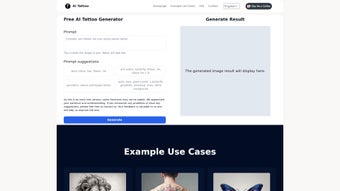
The platform works entirely in the browser, meaning there’s no bulky software to install, and it runs on any modern operating system that supports a stable internet connection. Users type in keywords—such as “Japanese koi fish in watercolor style” or “minimalist black‑line mountain silhouette”—and the AI engine generates a custom illustration in seconds. The result is a downloadable PNG or SVG file at 300 dpi, ready to be shared with a tattoo artist or posted on social media for feedback.
Even though AI Tattoo Vision is still in its early test phase, it already provides unlimited design generation, allowing users to experiment without worrying about credits or subscription limits. The service focuses on speed, quality, and creativity, making it a valuable tool for anyone who wants to explore tattoo ideas quickly and securely. Because the tool runs in a secure HTTPS environment and does not retain personal data after a session, users can feel confident that their private concepts remain private.
In addition to the core generation feature, the platform offers a simple library of style presets, color‑palette selectors, and a “favorites” button that lets you bookmark the designs you love for later reference. This makes the workflow from concept to consultation smoother, helping both artists and clients converge on a final design faster than ever before.
Key Features & How the AI Engine Works
- AI‑Powered Design Generation: Uses a deep‑learning model trained on thousands of tattoo styles to produce original artwork based on textual input.
- High‑Resolution Output: Designs are rendered at 300 dpi, suitable for both digital mock‑ups and print‑ready references.
- Unlimited Creations: No credit system or pay‑per‑design; users can generate as many concepts as they need during the test period.
- Broad Style Library: Supports traditional, neo‑traditional, watercolor, geometric, tribal, realistic, and many niche sub‑genres.
- Multi‑Color Support: Users can request full‑color palettes, grayscale, or black‑and‑white designs with precise hue control.
- Cross‑Platform Accessibility: Works on Windows, macOS, Linux, Android, and iOS browsers without additional plugins.
- One‑Click Download: Generated images are instantly downloadable in PNG or SVG format for easy sharing.
- Privacy‑First Architecture: All user inputs are processed anonymously; no personal data is stored after the session ends.
The underlying AI model combines a text‑to‑image transformer with a style‑conditioned GAN (Generative Adversarial Network). When you submit a description, the transformer parses the semantic meaning—identifying keywords like “dragon,” “neon,” or “minimalist.” Those cues are then fed into the GAN, which selects the most appropriate visual elements from its training set and blends them into a cohesive design that respects the requested style and color constraints.
Because the system is cloud‑based, updates to the model are rolled out automatically, meaning you always benefit from the latest improvements without needing to download patches. This continuous learning loop also helps the AI adapt to emerging tattoo trends, ensuring that the generated artwork stays fresh and relevant. Future roadmap items include an optional in‑app vector editor, batch‑generation for studio workflows, and integration with popular tattoo‑studio management platforms.
All of these features are delivered through a lightweight web UI that prioritizes speed and accessibility. Even on lower‑end devices, the heavy lifting occurs on secure servers, allowing the browser to remain responsive while the AI crafts detailed illustrations in the background.
Getting Started: Installation, Usage & Compatibility
Installation – No Download Required
AI Tattoo Vision is a pure web app, so there is nothing to install on your device. Simply navigate to the official website using a modern browser such as Chrome, Edge, Firefox, or Safari. The platform detects your operating system automatically and adjusts the UI for optimal performance.
For users who prefer a shortcut, you can create a desktop shortcut (Windows) or an application shortcut (macOS) that opens the site in a dedicated window, giving the feel of a native app. This is especially handy for tattoo studios that want quick access during client consultations.
Step‑by‑Step Usage
- Enter Your Concept: In the main input box, type a concise description of the tattoo you envision. Include style, subject, color scheme, and any size constraints (e.g., “small, minimalist black‑line compass on wrist”).
- Select Optional Parameters: Use the dropdown menus to fine‑tune the output—choose “Resolution,” “File Type,” or “Style Bias” (e.g., “more watercolor”).
- Generate: Click the “Create Design” button. The AI typically returns a result within 5‑10 seconds, depending on server load.
- Review & Download: A preview window displays the high‑resolution image. If satisfied, click “Download PNG” or “Download SVG.” The file saves directly to your device’s default download folder.
- Share or Refine: You can copy the link to the design for sharing with an artist, or re‑run the generator with adjusted text to explore variations.
- Tips for Best Results: Use specific adjectives (e.g., “vivid watercolor koi fish with splashes of orange”) and avoid overly vague phrases. Adding size hints (e.g., “8 cm diameter”) helps the AI keep proportions realistic.
Compatibility (itemprop="operatingSystem")
Because AI Tattoo Vision runs in a browser, it is compatible with the following operating systems:
- Windows 10, 11 (any recent version)
- macOS Catalina (10.15) and later
- Linux distributions with recent Chromium/Firefox builds
- Android 8.0 (Oreo) and later (Chrome or Firefox mobile)
- iOS 13 and later (Safari or Chrome)
The platform requires at least 2 GB of RAM and a stable broadband connection (minimum 5 Mbps) for optimal performance. Low‑end devices may experience slightly longer generation times, but the final image quality remains consistent across all supported platforms. If you encounter a blank screen, clearing the browser cache or switching to a different browser usually resolves the issue.
Pros, Cons & Frequently Asked Questions
Before you dive into the creative flow, it helps to understand where AI Tattoo Vision shines and where it still has room to grow. The following pros and cons are based on hands‑on testing, user feedback, and our own evaluation of the tool’s current capabilities.
Pros
- Generates truly unique designs tailored to user input.
- Intuitive, no‑learning‑curve interface suitable for beginners and professionals.
- High‑resolution, royalty‑free files ready for immediate use.
- Unlimited design generation during the test phase.
- Works on any device with a modern browser – no installation needed.
- Privacy‑first processing ensures your ideas stay confidential.
- Fast turnaround time (typically under 10 seconds per design).
Cons
- Early test version may exhibit occasional stability glitches.
- Interpretation accuracy can vary; vague descriptions may yield unexpected results.
- Lacks in‑app editing tools – you must rely on external software for tweaks.
- Limited interactivity (no live preview before final generation).
- Requires detailed user input to achieve the best outcomes.
- Occasional server load spikes can increase generation time.
FAQ (itemscope itemtype="https://schema.org/FAQPage")
Is AI Tattoo Vision free to use?
Yes. During the current test phase, the service is completely free and offers unlimited design generation without any hidden fees.
Can I use the generated designs commercially?
All designs are provided under a royalty‑free license for personal and commercial use, as long as you credit AI Tattoo Vision when distributing the artwork publicly.
What file formats are available for download?
You can download designs as PNG (raster) or SVG (vector). PNG is ideal for quick sharing, while SVG allows scaling without loss of quality.
Do I need a powerful computer to run the AI?
No. All heavy processing occurs on the server side. Your device only needs a stable internet connection and a modern browser.
How secure is my data when I type a tattoo idea?
AI Tattoo Vision processes inputs anonymously and does not store personal data after the session ends. All communications are encrypted via HTTPS.
Can I request revisions of a generated design?
While the platform does not offer in‑app editing, you can simply adjust your description and generate a new version instantly.
Conclusion & Call to Action
AI Tattoo Vision stands out as a powerful, free, and instantly accessible tool for anyone looking to translate a fleeting tattoo concept into a polished visual mock‑up. Its AI engine delivers high‑resolution, style‑specific artwork without the need for expensive design software or artistic expertise. Although the platform is still in a testing phase, the unlimited generation model and cross‑device compatibility make it an invaluable addition to a tattoo enthusiast’s toolkit.
If you’re ready to explore limitless tattoo ideas, simply visit the AI Tattoo Vision website, type in your dream design, and download the result in seconds. The tool’s secure, privacy‑first architecture ensures that your creative thoughts remain confidential while you experiment with bold new concepts.
Don’t let indecision stall your next ink session—download AI Tattoo Vision today, generate your first design for free, and share it with your favorite artist to bring your vision to life. Keep an eye on upcoming updates, as the developers plan to introduce batch generation, an integrated vector editor, and deeper studio‑workflow integrations that will further streamline the path from idea to ink.
Ready to get started? Click the link below, unleash your imagination, and join the growing community of tattoo lovers who are already using AI Tattoo Vision to shape their next masterpiece.
Customer Review
Pros: Unique AI designs, free unlimited use, high‑resolution output, fast generation, cross‑platform access.
Cons: Early version may glitch, limited editing tools, occasional latency during peak usage.



.png)



